1
Open Manage Repositories
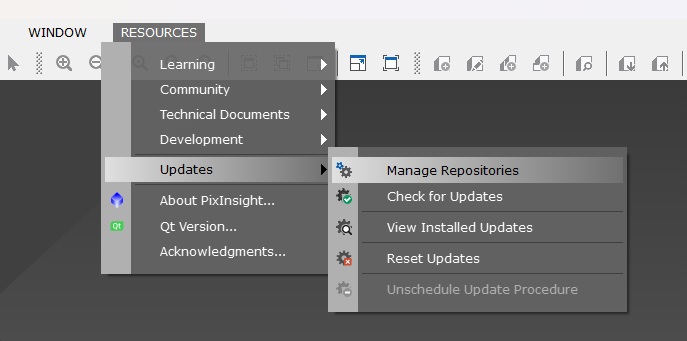
In PixInsight, go to Resources, then Updates, then Manage Repositories.
PixInsight module setup
HalolessAI is a paid PixInsight process module, with a free 7-day trial. It removes the halos, rings and reflections around stars in linear images. This page walks through all three steps: getting it on Ko-fi, installing it through PixInsight's repository manager, and activating your license.
Step 1
HalolessAI is sold through Ko-fi, and the 7-day trial is there too. Get it there first. The activation code for the last step comes by email with your purchase or trial.
Step 2
Add the HalolessAI repository so PixInsight can find and install the module. Copy the URL below, then add it in PixInsight through the update repository manager.
In PixInsight, go to Resources, then Updates, then Manage Repositories.
In the repository manager window, click the Add button.
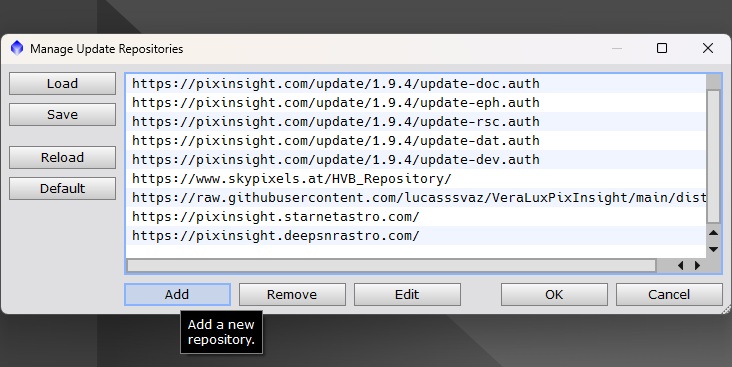
Paste the copied URL into the repository URL field, then press OK.
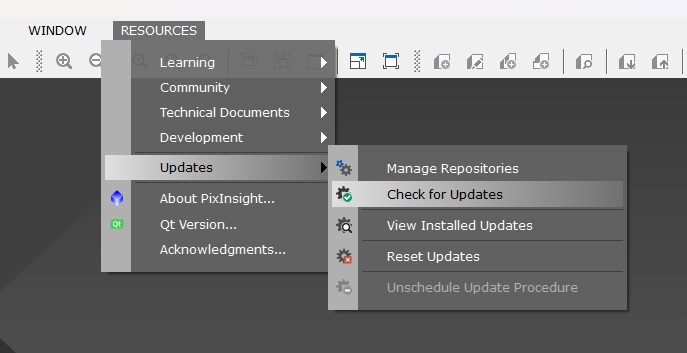
Run Check for Updates, install the available HalolessAI module, and restart PixInsight if requested.
Step 3
Once installed, HalolessAI needs to be activated with the code from your Ko-fi order or trial.
After purchase or trial sign-up, you'll receive an email with your activation code. Leave that email open, you'll need the code for step 3 below.
Can't find it? Check your spam folder.
After installing, go to Process > ImageRestoration and click HalolessAI. Press the wrench icon to open the activation window.
Enter the email address you used on Ko-fi and the activation code from the email you received, then click Activate.
You'll receive a second email with an activation link. You must click that link to activate your HalolessAI module.
Back in the activation window, press Check status. You should see a message confirming activation is valid.